Keyboard Shortcuts
LogViewer is built for rapid keyboard navigation during intense debugging sessions, and includes a customizable Keymap editor so you can tailor bindings to your workflow.
Default Keyboard Shortcuts
| Category | Action | macOS | Linux & Windows |
|---|---|---|---|
| File | Open Settings | Cmd+, | Ctrl+, |
| Logs | Open log files | Cmd+O | Ctrl+O |
| Logs | Refresh opened logs | Cmd+R | F5 |
| Logs | Close currently opened logs | Cmd+W | Ctrl+W |
| Logs | Go to timestamp | Cmd+G | Ctrl+G |
| Logs | Inspect selected log line in detail | Cmd+I | Ctrl+I |
| Logs | Remove selected line from My Logs | Del | Del |
| Filters | Open filter files | Cmd+Shift+O | Ctrl+Shift+O |
| Filters | Search across all filters | Cmd+Shift+F | Ctrl+Shift+F |
| Filters | Quick inline search in filter list | / | / |
| Filters | Previous filter match in logs | , (<) |
, (<) |
| Filters | Next filter match in logs | . (>) |
. (>) |
| Filters | Toggle selected filter(s) on/off | Space | Space |
| Filters | Edit selected filter | Enter | Enter |
| Filters | Delete selected filter(s) | Del | Del |
| Search | Find in active log table | Cmd+F | Ctrl+F |
| Search | Next search match | F3 / Enter | F3 / Enter |
| Search | Previous search match | Shift+F3 / Shift+Enter | Shift+F3 / Shift+Enter |
| Navigation | Switch to Main Logs tab | Cmd+1 | Ctrl+1 |
| Navigation | Switch to Bug Report tab | Cmd+2 | Ctrl+2 |
| Navigation | Switch to Live Logs tab | Cmd+3 | Ctrl+3 |
Customizing Shortcuts (Keymap)
You can view, search, and rebind keyboard shortcuts directly inside LogViewer by opening File > Settings > Keymap (or selecting Help > Keyboard Shortcuts... from the menu bar):
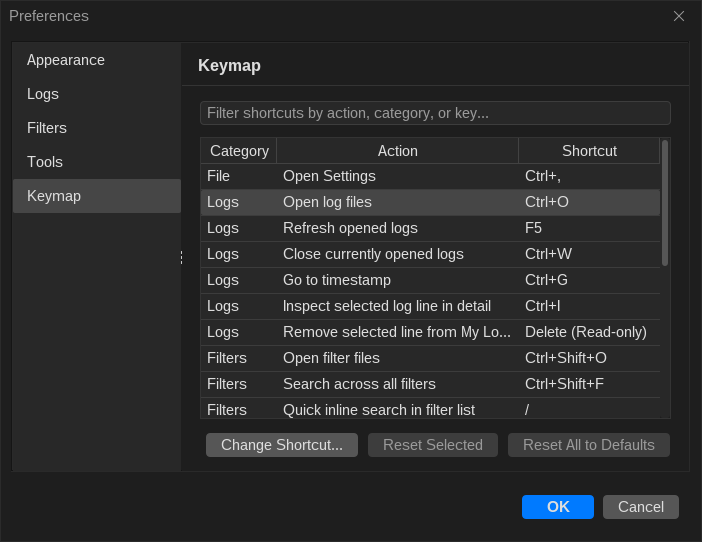
- Instant Search: Filter the shortcut table by category, action name, or key combination.
- Rebind Any Action: Double-click an action row (or click Change Shortcut...) and press your desired key combination. Customized shortcuts are highlighted in bold.
- Conflict Detection: LogViewer automatically checks for keybinding collisions within the same or global activation scope and warns you before overriding existing bindings.
- One-Click Reset: Restore an individual shortcut with Reset Selected, or revert all shortcuts to their platform defaults with Reset All to Defaults.